



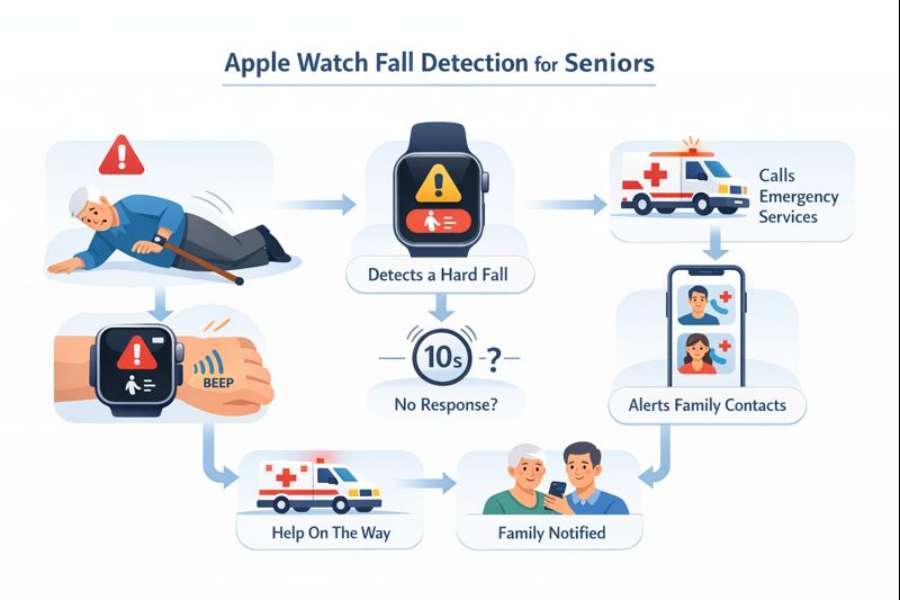
Falls are one of the most serious health risks for older adults. A single fall can lead to injury, loss of independence, or long-term complications, especially when help is delayed. As technology becomes more integrated into everyday life, devices like the Apple Watch have introduced features designed to improve safety and response time. One of the most talked-about features for older adults is fall detection.
- Why Fall Detection Matters for Seniors
- Health risks associated with falls
- Delayed assistance and its consequences
- Role of technology in fall prevention and response
- What Apple Watch Fall Detection Is
- How Apple Watch Fall Detection Works
- Emergency Response and SOS Functionality
- Automatic vs Manual Activation for Seniors
- Apple Watch Models Suitable for Seniors
- Ease of Use for Older Adults
- Accuracy of Apple Watch Fall Detection
- The Single Most Important Benefit for Seniors
- Comparison With Traditional Medical Alert Systems
- Set Up Process for Seniors and Caregivers
- Privacy and Data Considerations
- Limitations of Apple Watch Fall Detection
- Suitability for Different Senior Lifestyles
- Integration With Broader Health Monitoring
- Role of Caregivers and Family Members
- Common Concerns Seniors Have About Wearing an Apple Watch
- Cost Considerations for Seniors
- When Apple Watch Fall Detection May Not Be Enough
- Combining Fall Detection With Other Safety Measures
- Long-Term Use and Adaptation
- Final Thoughts on Apple Watch Fall Detection for Seniors
This guide explains how Apple Watch fall detection works for seniors, what it can and cannot do, how reliable it is in daily life, and whether it is a practical safety tool for aging individuals.
Why Fall Detection Matters for Seniors
Falls are not just accidents. For seniors, they are often life-changing events.
Health risks associated with falls
Falls can lead to fractures, head injuries, and reduced mobility. Even when injuries are minor, fear of falling again can limit activity and independence.
Delayed assistance and its consequences
Many fall-related complications occur because help does not arrive quickly. Long periods on the floor increase the risk of dehydration, hypothermia, and muscle breakdown.
Role of technology in fall prevention and response
Fall detection does not prevent falls, but it can dramatically reduce response time. Faster assistance often leads to better outcomes and reduced complications.
What Apple Watch Fall Detection Is
Apple Watch fall detection is a safety feature that recognizes hard falls and automatically calls for help if the wearer does not respond.
Purpose of the feature
The goal is to detect sudden impacts followed by immobility and trigger emergency actions when necessary.
Devices that support fall detection
Fall detection is available on newer Apple Watch models. It relies on motion sensors and algorithms that continuously analyze movement patterns.
How Apple Watch Fall Detection Works
Understanding how the feature operates helps set realistic expectations.
Motion sensors and impact analysis
The Apple Watch uses an accelerometer and gyroscope to detect sudden changes in movement. When a fall-like motion occurs, the system analyzes the impact intensity and subsequent movement.
Immobility detection
If the watch detects a hard fall followed by little or no movement, it initiates a response sequence.
User response window
After detecting a fall, the watch displays an alert asking whether the wearer is okay. The user can dismiss the alert or indicate that help is needed.
If the wearer does not respond within a set period, the watch automatically contacts emergency services.
Emergency Response and SOS Functionality
Fall detection is closely tied to the Apple Watch’s emergency SOS feature.
Automatic emergency call
If no response is detected, the watch calls emergency services and shares the user’s location.
Emergency contacts notification
The watch also notifies designated emergency contacts with a message and location details.
Location accuracy
The Apple Watch uses GPS and cellular data when available. Accuracy depends on signal strength and environment.
Automatic vs Manual Activation for Seniors
Apple Watch fall detection can be configured differently based on age and activity.
Automatic activation for seniors
For users aged 65 and older, fall detection is typically enabled automatically during setup. This makes it especially suitable for seniors who may forget to activate safety features.
Manual activation options
Younger users or caregivers can enable fall detection manually if desired, particularly for seniors under 65 with mobility risks.
Apple Watch Models Suitable for Seniors
Not all Apple Watch models are equally suited for older adults.
Importance of cellular capability
Models with cellular connectivity allow emergency calls without a nearby iPhone. This is especially important for seniors who may not carry a phone at all times.
Screen size and readability
Larger screens improve readability for seniors with vision challenges. Adjustable text size also improves usability.
Battery considerations
Battery life typically lasts one day. Regular charging habits are essential to ensure the feature remains active.
Ease of Use for Older Adults
Technology must be simple to be effective.
Minimal interaction required
Once set up, fall detection works passively. Seniors do not need to press buttons or navigate menus during an emergency.
Clear alerts and prompts
Alerts use large text, sound, and vibration to capture attention.
Accessibility features
Apple Watch includes accessibility settings such as larger text, voice feedback, and simplified interfaces that benefit seniors.
Accuracy of Apple Watch Fall Detection
Accuracy is a common concern among seniors and caregivers.
Detection reliability
Apple Watch fall detection is designed to detect hard falls rather than minor stumbles. It performs well for sudden, high-impact falls.
False positives
Certain activities, such as vigorous exercise or abrupt movements, can occasionally trigger alerts. These can be dismissed easily, but they may cause brief confusion.
Missed detections
Slow or sliding falls may not always be detected. Fall detection is not a replacement for medical alert systems, but a supplemental safety tool.
The Single Most Important Benefit for Seniors
This is the only section that uses bullet points.
-
Automatic emergency calling when the user is unresponsive
-
Faster response times after serious falls
-
Location sharing with emergency services and contacts
-
No need to press buttons during an emergency
-
Discreet, wearable design suitable for daily use
-
Integration with health and activity tracking
These benefits make fall detection especially valuable for seniors who live alone or remain active.
Comparison With Traditional Medical Alert Systems
Many seniors already use medical alert devices. Understanding the differences helps in choosing the right option.
Wearability and comfort
Apple Watch looks like a regular watch, which some seniors prefer over pendant-style alert devices.
Manual vs automatic response
Traditional systems often require pressing a button. Apple Watch can act automatically if the user is unable to respond.
Monthly fees
Apple Watch requires no dedicated monitoring subscription, though cellular service adds cost.
Monitoring limitations
Medical alert systems often include 24/7 monitoring centers, which the Apple Watch does not provide.
Set Up Process for Seniors and Caregivers
Proper setup is essential for reliable operation.
Initial configuration
Setting up fall detection involves enabling the feature, adding emergency contacts, and confirming medical ID details.
Caregiver involvement
Many seniors benefit from caregiver assistance during setup to ensure all settings are correct.
Testing the system
Testing alerts and emergency contacts provides peace of mind and confirms functionality.
Privacy and Data Considerations
Privacy is an important concern for seniors.
Data sharing limitations
Emergency information is shared only during alerts or emergency calls.
Health data protection
Health data is encrypted and stored securely within Apple’s ecosystem.
Control over settings
Seniors or caregivers can control what data is shared and with whom.
Limitations of Apple Watch Fall Detection
No technology is perfect.
Dependency on battery life
If the watch is not charged, fall detection will not function.
Coverage gaps
Emergency calling depends on cellular or Wi-Fi availability.
Not a fall prevention tool
The watch does not prevent falls or replace physical safety measures.
Suitability for Different Senior Lifestyles
Fall detection effectiveness varies by lifestyle.
Active seniors
Active seniors benefit from continuous monitoring during daily activities and outdoor movement.
Seniors living alone
Fall detection provides reassurance for those without immediate access to help.
Seniors with mobility challenges
Those with balance issues may benefit but should understand limitations for slow falls.
Integration With Broader Health Monitoring
Apple Watch includes additional health features that support senior wellness.
Heart rate and rhythm monitoring
These features may detect irregular heart rhythms that increase fall risk.
Activity tracking
Encourages gentle movement, which supports balance and strength.
Health trend awareness
Long-term data can help identify changes that may increase fall risk.
Role of Caregivers and Family Members
Caregivers play an important role in maximizing benefits.
Monitoring emergency alerts
Emergency contacts receive notifications, enabling quick response.
Encouraging consistent use
Regular wear and charging habits ensure reliability.
Reviewing health data together
Shared insights support proactive health management.
Common Concerns Seniors Have About Wearing an Apple Watch
Addressing concerns improves adoption.
Fear of complexity
Once configured, daily use is simple and passive.
Comfort and skin sensitivity
Proper band selection improves comfort and reduces irritation.
Appearance and stigma
Apple Watch blends in as a normal accessory rather than a medical device.
Cost Considerations for Seniors
Affordability matters.
Device cost
Apple Watch pricing varies by model and features.
Cellular service cost
Monthly cellular plans add an ongoing expense but improve independence.
Value compared to alternatives
For seniors who want both safety and health tracking, Apple Watch offers a combined value.
When Apple Watch Fall Detection May Not Be Enough
Certain situations may require additional support.
Severe mobility impairment
Dedicated medical alert systems may offer better monitoring.
Cognitive impairment
Seniors with dementia may need supervised or specialized safety solutions.
Rural or low-coverage areas
Emergency response reliability depends on network access.
Combining Fall Detection With Other Safety Measures
Technology works best alongside physical safety strategies.
Home modifications
Grab bars, non-slip mats, and good lighting reduce fall risk.
Balance and strength training
Exercise improves stability and confidence.
Regular medical checkups
Addressing vision, medication side effects, and balance issues reduces falls.
Long-Term Use and Adaptation
Fall detection is most effective when integrated into daily life.
Habit formation
Consistent wear ensures protection.
Periodic review
Settings and contacts should be updated as needs change.
Ongoing reassurance
Many seniors report greater confidence and independence.
Final Thoughts on Apple Watch Fall Detection for Seniors
Apple Watch fall detection offers meaningful safety support for seniors, particularly those who value independence and live active lives. While it is not a replacement for comprehensive medical alert systems, it provides automatic emergency response, discreet wearability, and health integration that many older adults find empowering.
For seniors who are comfortable with technology and willing to maintain charging habits, Apple Watch fall detection can be a valuable layer of protection, offering peace of mind for both wearers and their loved ones.
